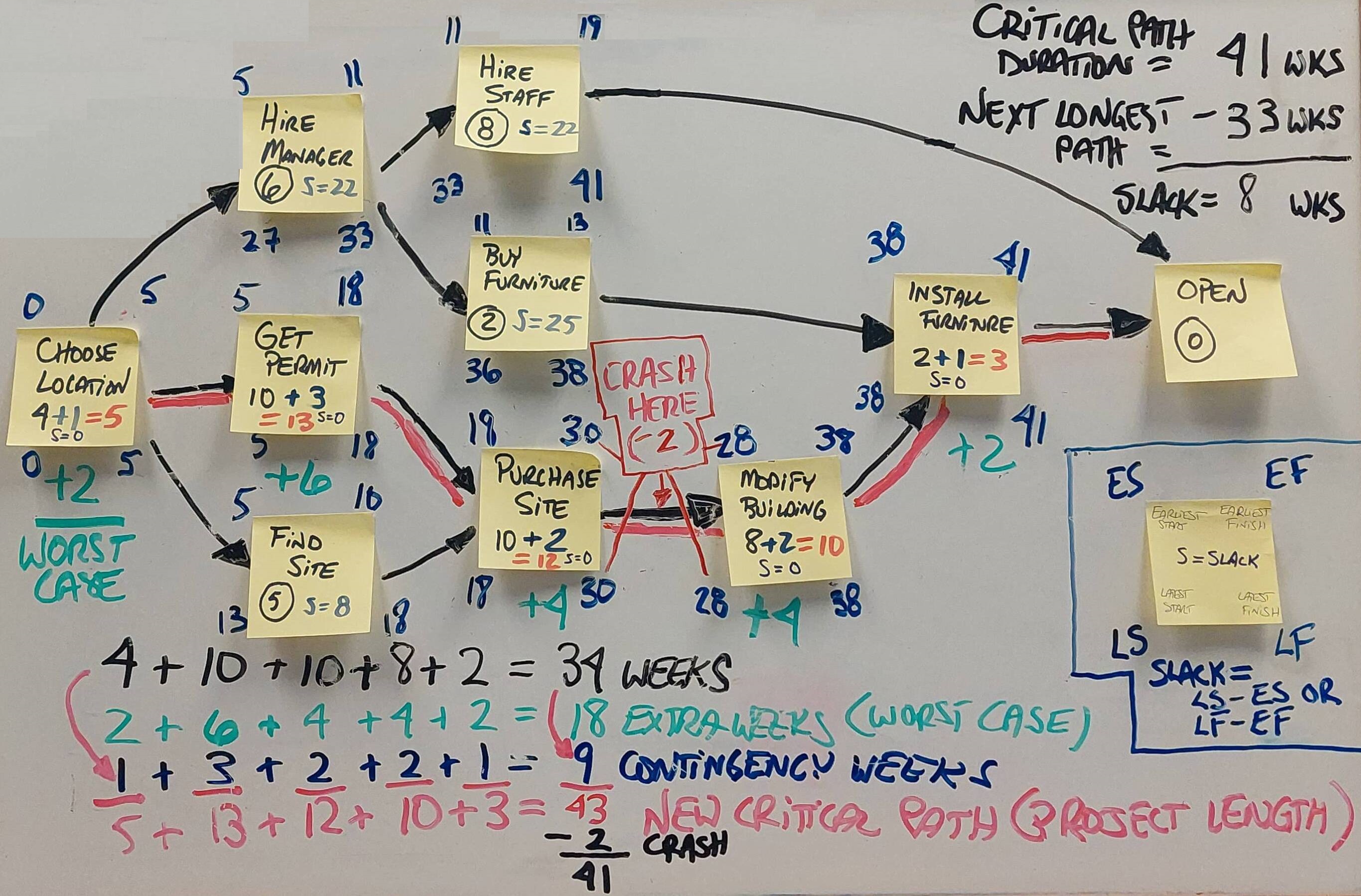
Project Management Critical Path White Board (Creating a Network Diagram)
Steps:
1. Detail what the various steps of the project will be (write these on sticky notes).
2. Arrange the sticky notes on a white board, in order one after another, for those tasks that are contingent on each other (and in parallel for those tasks that can be done while other tasks are begin completed). Thus, you will end up with tasks that need to be done before others, you will have tasks that need to be done after others, and you will have tasks that can be completed alongside of other tasks (at the same time as others).
3. Draw arrows from each sticky note/task to other ones; exept for the beginning and the ending task, each one should have at least one arrow going into it and one arrow going out (more than one might be going in or going out on some of them, of course).
4. Assign blocks of times (days, weeks, months) that each task will take (these should be reasonable or expected amounts)
5. Find your critical path - the time critical path that will take the longest for you to go through (in the image, the critical path is denoted by way of the red line on the white board).
6. Build in contingency with the 90% rule:
a. For each task on the critical path (and ONLY on the critical path), determine with great honesty what the worst case time scenario will be for that task - add the additional worst case scenario time to each task, coming up with a new 'worst case scenario' number for that task.
b. Add up each of the new numbers on the critical path, arriving at a new aggregate worst case scenario number for your critical path.
c. Take the difference between your new worst case scenario critical path number and the old critical path number and divide it in half (this is your new 90% number, the amount of additional time you need to add to the critical path in order to make your project 90% achievable in terms of total project time.)
d. Do not simply add this additional number (half of the difference between your two critical path numbers) to the old critical path figure - instead, go back through your critical path and sprinkle bits of your additional time into each of the tasks/steps of your critical path.
e. This new critical path is now the critical path you will use when you submit your projections as to how much time your project is going to take.